Green Pool Water: Causes and How to Fix It Fast
By Derek Bowen, founder of Pool Rental Near Me and author of 7 books on pool hosting · Updated May 2, 2026
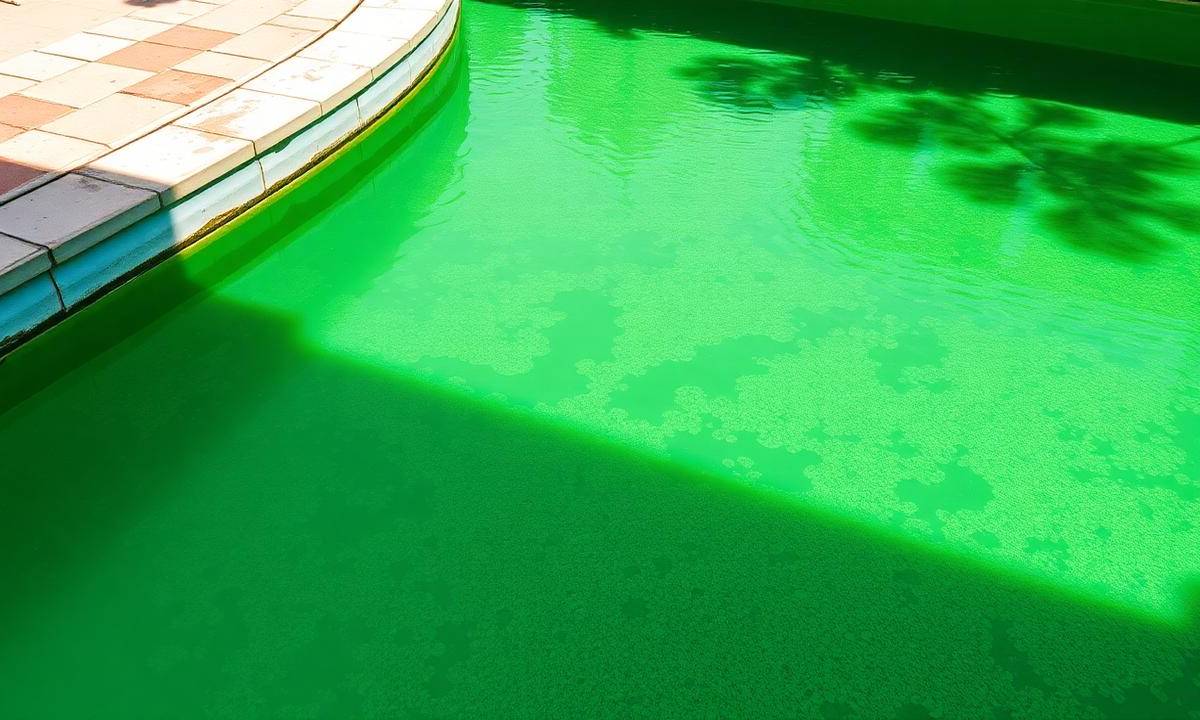
Nothing ruins a host’s booking calendar faster than a green pool. For peer-to-peer pool hosts, crystal-clear water isn't just a matter of aesthetics; it is a vital safety requirement and a key driver of positive reviews on PoolRentalNearMe.com/pool-rental-near-me-the-airbnb-of...
Nothing ruins a host’s booking calendar faster than a green pool. For peer-to-peer pool hosts, crystal-clear water isn't just a matter of aesthetics; it is a vital safety requirement and a key driver of positive reviews on PoolRentalNearMe.com. When a guest arrives expecting a sparkling blue oasis and finds a swampy mess instead, it results in cancellations, refunds, and potential damage to your ranking.
Green water is almost always a sign of algae growth, which indicates a failure in your sanitization or filtration system. Turning a green pool around requires a systematic approach to chemistry rather than just "guessing and dumping" chemicals. This guide will walk you through identifying the root causes and implementing a fast, effective fix to get your rental back in business.
The Common Causes of Green Pool Water
Understanding why your pool turned green is the first step in ensuring it doesn't happen again next weekend. While "algae" is the short answer, several factors contribute to its bloom.
1. Low Chlorine Levels
Chlorine is your primary defense against organic contaminants. When the Free Chlorine (FC) level drops below 2-4 parts per million (ppm), algae can take hold and multiply rapidly, especially in warm weather. This often happens after a high-occupancy weekend where heavy "bather load" has consumed all the available sanitizer.
2. High pH and Alkalinity
If your pH is too high (above 7.8), your chlorine becomes significantly less effective. Even if you have chlorine in the water, a high pH prevents it from "killing" the algae. Transitioning your pool from green to blue requires balancing and maintaining perfect water quality to ensure your chemicals can actually do their jobs.
3. Poor Filtration and Circulation
Dead spots in a pool—areas where water doesn't move—are breeding grounds for spores. If your pump isn't running long enough or your filter is clogged with debris, the water remains stagnant, allowing algae to settle on the walls and floor.
4. Excessive Cyanuric Acid (CYA)
Known as "stabilizer," CYA protects chlorine from being burned off by the sun. However, if levels exceed 50-70 ppm, it "locks" the chlorine, making it ineffective. This is a common issue for hosts who use too many stabilized chlorine tablets (trichlor) over a long season.
How to Diagnose the Severity
Before you start treating the water, you need to determine which type of algae you are dealing with. Knowing the severity helps you calculate the chemical dosages required.
- Light Green/Teal: This is typically the beginning of an algae bloom. The water is slightly hazy, and you may see small patches on the stairs. This is the easiest to fix.
- Dark Green: This indicates an established bloom. The floor of the pool may no longer be visible. You will need a significant amount of "shock" to reach the breakpoint chlorination level.
- Black or Mustard Algae: If you see dark spots that look like dirt but don't brush away easily, or yellow-gold dust on the shady side of the pool, you are dealing with more resistant strains that require specialized algaecides and heavy scrubbing.
Invest in a high-quality liquid drop test kit (like the Taylor K-2006) rather than relying solely on test strips for an accurate diagnosis. If you are unsure how to read your results, review our guide on pool chemistry basics.
Step-by-Step Fix: The "SLAM" Method
The most effective way to clear a green pool is the SLAM method: Shock, Level, And Maintain. For hosts, time is money, so follow these steps strictly to clear the water within 24 to 48 hours.
Step 1: Clean and Scrub
Remove all large debris (leaves, sticks) using a net. If you can’t see the bottom, go slow so you don't stir up the silt. Next, use a nylon or stainless steel brush to vigorously scrub the walls, steps, and floor. This breaks the protective outer layer of the algae so the chlorine can penetrate it.
Step 2: Test and Adjust pH
Chlorine works best in slightly acidic water. Before shocking, use a pH reducer (muriatic acid or dry acid) to bring your pH down to approximately 7.2. Do not attempt to shock the pool if the pH is above 7.8, as you will waste half of your chemicals.
Step 3: Shock the Pool (Breakpoint Chlorination)
Use liquid chlorine (sodium hypochlorite) for the fastest results. You need to raise your Free Chlorine level to 20-30 ppm, depending on your CYA levels.
- Light Green: 1 gallon of liquid chlorine per 10,000 gallons of water.
- Dark Green/Black: 3-4 gallons of liquid chlorine per 10,000 gallons of water.
Step 4: Run the Filter Continuously
Turn your pump to "Filter" and run it 24/7 until the water is clear. Check the pressure gauge on your filter every few hours. As the chlorine kills the algae, the dead organic matter will clog the filter quickly. Backwash (for sand/DE filters) or rinse the cartridges whenever the pressure rises 8-10 psi above the clean starting pressure.
Step 5: Test and Repeat
Test your chlorine levels twice a day. If the level drops, add more liquid chlorine to stay at that "shock" level. The water will transition from green to a cloudy "milky" blue. This is a good sign—it means the algae is dead. Keep filtering until the cloudiness disappears.
Prevention Strategies for Pool Hosts
To maintain a 5-star rating and maximize your host tools, prevention must be part of your weekly pool maintenance routine.
- Implement a "Post-Guest" Routine: After every rental, check the chlorine levels. If you had a large group (over 10 people), proactively add a small dose of liquid chlorine to "reset" the bather load.
- Use Phosphates Removers: Algae feeds on phosphates. Using a phosphate remover once a month starves any potential algae blooms before they start.
- Increase Pump Run Time: During the peak of summer, your pump should run at least 10-12 hours a day. If the air temperature is consistently over 90°F, consider running it 16-24 hours.
- Automate Sanitization: Consider installing a saltwater chlorine generator or an automatic liquid feed system. These tools provide a steady drip of sanitizer, preventing the "peaks and valleys" that lead to green water.
When to Call a Professional
If you have followed the SLAM method for more than 72 hours and the water is still green, there may be deeper issues. You should call a licensed pool professional if:
- The Filter is Failing: If the pressure doesn't change or the water isn't moving, your pump impeller or filter grids may be broken.
- Clogged Lines: If there is zero suction, you likely have a clog in the underground plumbing.
- High Metal Content: Sometimes green water is caused by oxidized copper (from cheap algaecides or heater erosion) rather than algae. Metals require a sequestrant, not chlorine.
If you need help finding a local pro to get your listing back online, contact our host support line at 866-420-3702 or email support@poolrentalnearme.com.
Frequently Asked Questions
Is it safe to swim in a green pool?
No. Green water indicates a lack of sanitizer, meaning bacteria like E. coli or parasites like Cryptosporidium could be present. Additionally, the lack of visibility is a major safety hazard; if a swimmer struggles at the bottom, they cannot be seen. Review our pool safety essentials for more on guest protection.
How long does it take for a green pool to turn blue?
Depending on the severity and the strength of your filtration system, it typically takes 24 to 72 hours. Light algae can be cleared overnight with high-dose liquid chlorine, while "swirl-of-pea-soup" conditions may take several days of continuous filtering and scrubbing.
Can I use "Green-to-Blue" kits found at big-box stores?
While these kits often contain a mix of flocculants and shock, they can be a "band-aid" fix. Flocculants sink debris to the bottom, which then requires manual vacuuming to waste. For hosts, the SLAM method is generally more reliable as it fully sanitizes the water rather than just hiding the particles.
Why does my pool turn green every time it rains?
Rainwater itself isn't green, but it brings in nitrates and organic debris while diluting your chlorine levels. Heavy rain can also drop the pH of your pool. After a storm, always test your water and "bump" your chlorine levels to compensate for the organic load.
Final Thoughts
A green pool can feel like a disaster when you have a booking scheduled for the weekend, but with the right chemical approach, it is a manageable problem. By maintaining a strict testing schedule and ensuring your filtration system is optimized, you can provide a safe, beautiful environment for your guests. Remember, consistency is the key to avoiding the "green monster." If you need further assistance with your account or listing status during a maintenance closure, visit our help-center for support.
Related articles
Frequently asked questions
- What is Pool Rental Near Me?
- Pool Rental Near Me is a peer-to-peer marketplace where homeowners rent out their backyard pools by the hour. Guests get a private pool, hosts earn money, and every booking requires a signed guest waiver. Hosts carry their own insurance.
- How much does a private pool rental cost?
- Most pool rentals range from $40 to $150 per hour depending on the pool, amenities, location, and time of day. You see the full price before you book.
- How much can I earn renting out my pool?
- That depends on your hourly rate, amenities, and how many hours you host — there is no typical figure we can stand behind. Pool Rental Near Me charges 0% host fees, so you keep 100% of your listed price.